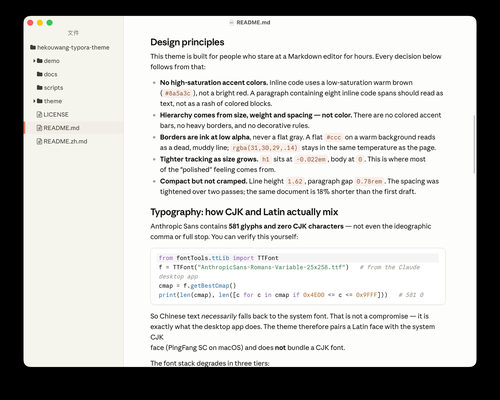
Hekouwang
Hekouwang for Typora
A Typora theme for people who write long-form Markdown in Chinese for hours — not chat-bubble density.
Themes menu (this listing / MIT zip):
| Menu | What you get |
|---|---|
| Hekouwang | Light · stone-50 paper · CJK long-form |
| Hekouwang Dark | Dark · stone-900 paper · same reading metrics |
Shared metrics (1.3.0): body 1rem · leading 1.65 · the paper follows the window with about 3rem of gutter on each side · reading column clamp(48rem, 100vw − 16rem, 96rem) · code and wide tables get 6rem more than the prose.
The CSS is generated from a token file (scripts/tokens.json → scripts/build.py) rather than hand-written.
Repo: huiyonghkw/hekouwang-typora-theme · live notes: GitHub Pages · 1.3.0 release
Design principles
- Built for CJK long-form. Chinese paragraphs need leading ≥1.6; the reading column grows with the window instead of leaving empty paper on wide screens. Prefer a narrower column? Put
:root { --hk-reading-measure: 60rem; }inhekouwang.user.css. - Quiet backgrounds. The paper stays white / neutral 50; tint lives only in the window frame and sidebar. The paper edge is a 1px ring plus a soft shadow (Tailwind
ring-1+shadow-sm), no inner shadow. - No high-saturation accents. Inline code uses a low-saturation warm brown so a line with many
`code`spans still reads as text. - Hierarchy from size, weight, and spacing — not color bars. No left accent stripes.
- Tables that behave. Tables align with the prose; wide tables (7+ columns) expand only as far as their content needs, then scroll inside their own box.
CJK / Latin mixing
Chinese uses the system face (PingFang SC on macOS); the theme bundles no CJK font. Latin text uses Inter (SIL OFL, Latin subset, ~100 KB, shipped) → system UI.
Installation
git clone https://github.com/huiyonghkw/hekouwang-typora-theme.git
cd hekouwang-typora-theme
./scripts/install.sh
Windows: .\scripts\install-windows.ps1. Or copy theme/hekouwang.css, theme/hekouwang-dark.css, and the theme/hekouwang/ folder into Typora’s themes directory (Preferences → Open Theme Folder).
Then quit Typora completely (Cmd+Q) and relaunch — switching themes does not reload a modified CSS file. Choose Hekouwang or Hekouwang Dark.
Customization
Do not edit the CSS; it is generated. Edit scripts/tokens.json and rebuild:
python3 scripts/build.py
The build asserts zero !important in editor rules (only the export section uses it to override Typora’s print base styles) and zero px font sizes except the root, so Typora’s font-size preference keeps working. It also audits text/control contrast for every variant, and the repo ships layout (window widths, narrow screens, tables) and A4/A5 PDF export checks.
Relationship to the gallery “Claude Theme”
There is already a Claude Theme with a similar goal. This is an independent implementation, not a fork — no CSS was copied.
| Gallery Claude Theme | Hekouwang | |
|---|---|---|
| Authoring | ~3,158 hand-written lines | generated from tokens |
!important |
397 | 0 in editor rules (build-enforced) |
| Font sizes | some px |
all rem except root |
| Bundled fonts | ~24 MB (incl. Noto Serif SC) | ~100 KB (Inter Latin) |
| Body CJK | Noto Serif SC (serif) | system sans-serif |
Dark variant
hekouwang-dark.css is designed separately, not inverted from light: stone-900 paper floats on a darker stone-950 frame and sidebar, and body text is stone-200 rather than pure white to reduce glare. Both variants share the same reading metrics.
Licensing
MIT for the free theme CSS and scripts. Only Inter (SIL OFL 1.1) is shipped. Independent work; not affiliated with Anthropic PBC.
Platform support
Designed and tested on macOS. Not fully tested, but should work for Windows/Linux. But this theme does not include styles for the Windows “unibody” style.