Clear Ink Bilingual
Clear Ink Bilingual for Typora
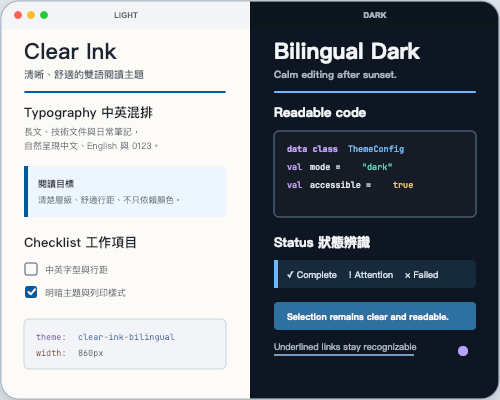
Clear Ink Bilingual is a light-and-dark theme pair designed for long-form Traditional Chinese and English reading. It keeps headings, mixed-script paragraphs, tables, code, and task lists calm and readable without relying on red and green alone to communicate state.
Designed and tested on macOS. Browser rendering has also been verified. Windows is not yet fully tested, but the package includes cross-platform fonts and Windows font fallbacks.
Features
- Light and dark themes —
Clear Ink BilingualandClear Ink Bilingual Darkshare the same typography and component rules. - Bilingual typography — bundled Inter, Noto Sans TC, and JetBrains Mono variable fonts keep Traditional Chinese, English, numbers, and code visually balanced.
- Color-vision accessibility — links use underlines, while selection, search, checklists, and status cues retain text, symbols, or borders in addition to color.
- Long-form reading layout — a maximum content width of
860px, comfortable line height, and restrained spacing support articles, technical notes, and documentation. - Typora UI coverage — includes sidebar, global search, source mode, task lists, tables, code, and print styles.
Installation
- Download and unzip the theme package.
- Open Typora → Settings → Appearance → Open Theme Folder.
- Copy
clear-ink-bilingual.css,clear-ink-bilingual-dark.css, and theclear-ink-bilingual/resource folder into the theme folder. - Restart Typora, then select Clear Ink Bilingual or Clear Ink Bilingual Dark from the Themes menu.
PDF Export
PDF output uses the warm-white light print style. When editing with Clear Ink Bilingual Dark, switch to Clear Ink Bilingual before exporting PDF.
繁體中文
Clear Ink Bilingual 提供共用排版規則的淺色與暗色主題,適合繁體中文、英文、數字與程式碼混排。主題隨附跨平台字型,連結、搜尋、選取與工作清單狀態不只依賴顏色辨識。使用暗色主題編輯時,請在匯出 PDF 前切換到淺色主題,以使用統一的暖白列印風格。