
Cromo
Cromo
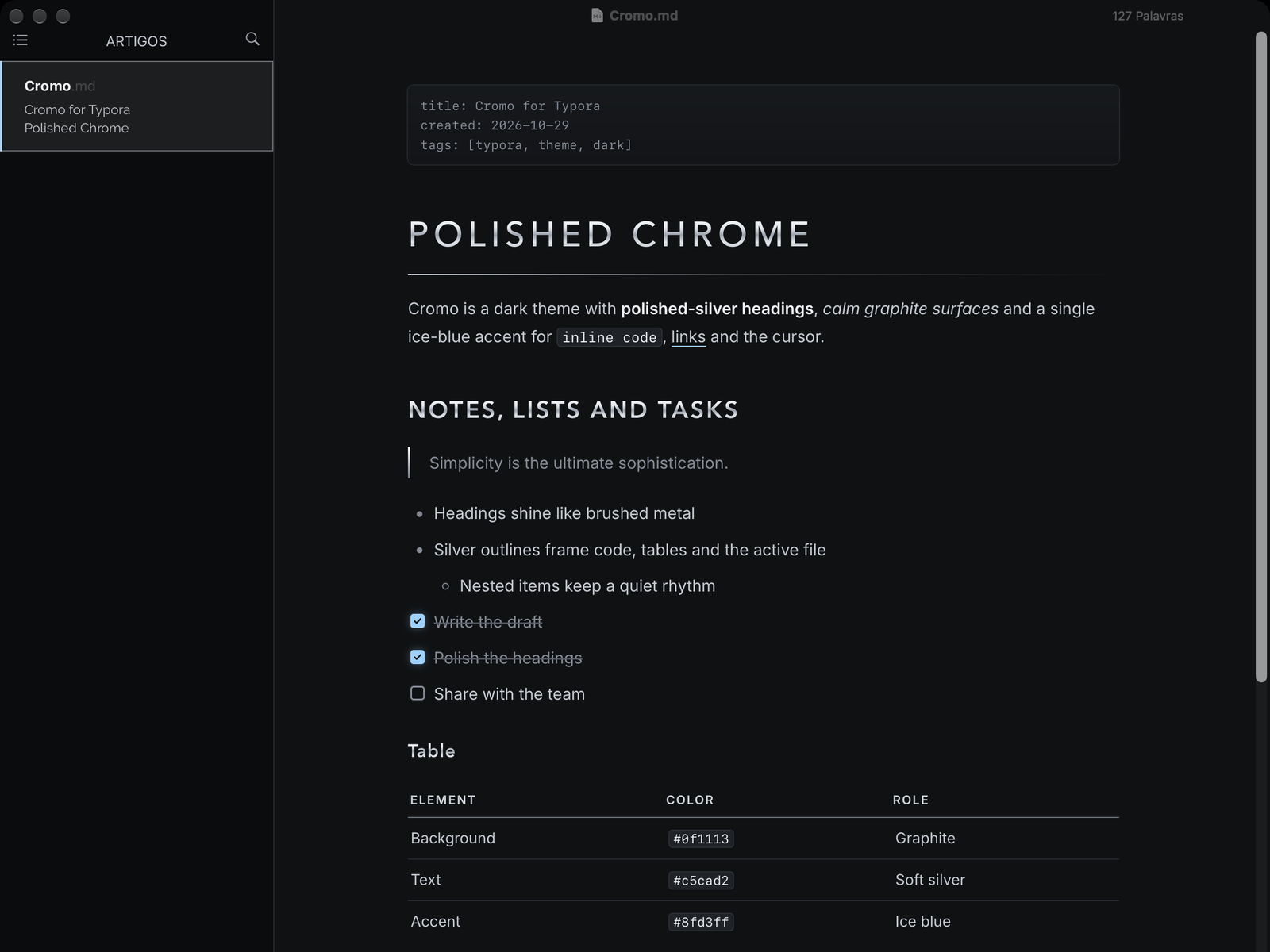
Cromo is a futuristic, metallic dark theme. Headings are filled with a polished-silver gradient, the page sits on calm graphite, and a single ice-blue accent marks the cursor, selection, links and checked tasks.
Highlights
- Polished-silver headings: H1 to H3 use a brushed-metal gradient. H1 is set in spaced capitals with a thin metal rule that fades to the right.
- Calm graphite background (
#0f1113) with soft silver text (#c5cad2) for long reading sessions. - One accent color: ice blue (
#8fd3ff) for the cursor, selection, links and checked tasks. - Silver outlines on code blocks, tables and the active file in the sidebar.
- Print-friendly: printing and PDF export switch to light colors with solid headings.
Installation
- Download the theme and unzip it.
- In Typora, open Preferences → Appearance → Open Theme Folder.
- Copy
cromo.cssinto that folder. - Restart Typora and choose Themes → Cromo.
Notes
Designed and tested on macOS (Typora 1.14). Not fully tested, but should work on Windows and Linux. This theme does not include styles for the Windows “unibody” window style.
Fonts: Avenir Next for headings, Inter for body text (falls back to the system font) and SF Mono for code.