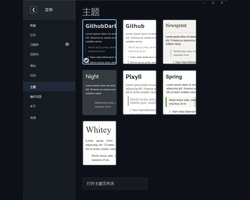
GitHub Dark
GitHub Dark
A GitHub-inspired dark theme designed for Typora on Windows and Ubuntu. It extends the familiar GitHub writing layout with a cohesive dark application interface.
Features
- Cross-platform dark chrome — Windows title-bar controls and Ubuntu application chrome share the editor’s dark visual surface.
- Complete dark interface — menu hub, context menus, dialogs, notifications, preferences, export pages, and native controls are consistently styled.
- Refined navigation — restrained file-list selection, readable outline tracking, and low-contrast scrollbars.
- Writing and coding support — tuned Markdown typography, source mode, syntax highlighting, tables, math, and Mermaid diagrams.
- Offline typography — Open Sans webfonts are bundled with the theme.
Installation
- Download and extract the repository archive.
- Open Typora File → Preferences → Appearance → Open Theme Folder.
- Copy
github-dark.cssand thegithub/directory into the theme folder. - Restart Typora and select GitHub Dark from the Themes menu.
Designed and tested with Typora 1.14.9 on Windows 10/11 and Ubuntu 22.04.