Typlatex
Typlatex
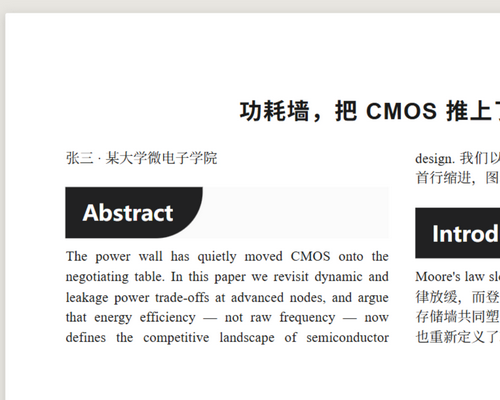
Typlatex (Typora + LaTeX) brings the look of a typeset journal article into
Typora. Documents are shown on an A4 paper card with fully justified,
two-column text, serif body type, unindented paragraphs separated by a small
gap (LaTeX-style first-line indents are one variable away), and booktabs-style
three-line tables. Export to PDF is a true A4 two-column page
via a single @page rule.
Features
- A4 paper preview — the document sits on a white A4 card over a gray
desk;
@page { size: A4 }makes PDF export match what you see. - Two-column journal typesetting — justified text, balanced columns, five-size (10.5pt) serif body, LaTeX-style indents (first paragraph after a heading is not indented).
- Figures & captions — an image on its own paragraph spans both columns
automatically (like
figure*); inline images stay in-column. An italic-only paragraph right after a figure becomes a centered blue caption — with or without a blank line between them. - Span anything with
---— the signature trick: the horizontal rule is an invisible trigger, so the next block (paragraph,$$math block, or table) crosses both columns. Tables use booktabs rules by default. - Six-theme family — combine column rhythm (journal / book / single column) with two looks: plain, and “Ink” — a dark label with one huge bottom-right round corner set into a light gray track, with coral bold emphasis.
Installation
- Download and unzip the theme package.
- Open Typora → Preferences → Appearance → Open Theme Folder.
- Copy the
.cssfile(s) you like into that folder. - Restart Typora and select the theme from the Themes menu.
Requires Typora ≥ 1.6 (uses CSS :has()). Tested on Typora 1.14.9
(Windows).
MIT licensed.